Product Features
Run analytical queries on your data lake, right from the Grepr UI



You can now run analytical queries over the data you have stored in your Grepr data lake, straight from the UI. It is available today for logs, with support for traces coming soon.
Grepr already writes every raw log message it receives to your own low-cost data lake, in an open format, so nothing is ever lost. The catch used to be getting at that data for analysis. Answering a question like "how many unique paths has this service served, broken down by status code" meant backfilling the data into your observability tool or standing up a separate query engine against the lake. Now you can ask the question where the data already lives, saving you valuable time.
Say you want the count of unique request paths your backend service has served over the past 10 minutes, broken down by HTTP status code. Each log message carries an HTTP status code and a request path, and you want to group on the status.
Head to the Analyze section and build the query:
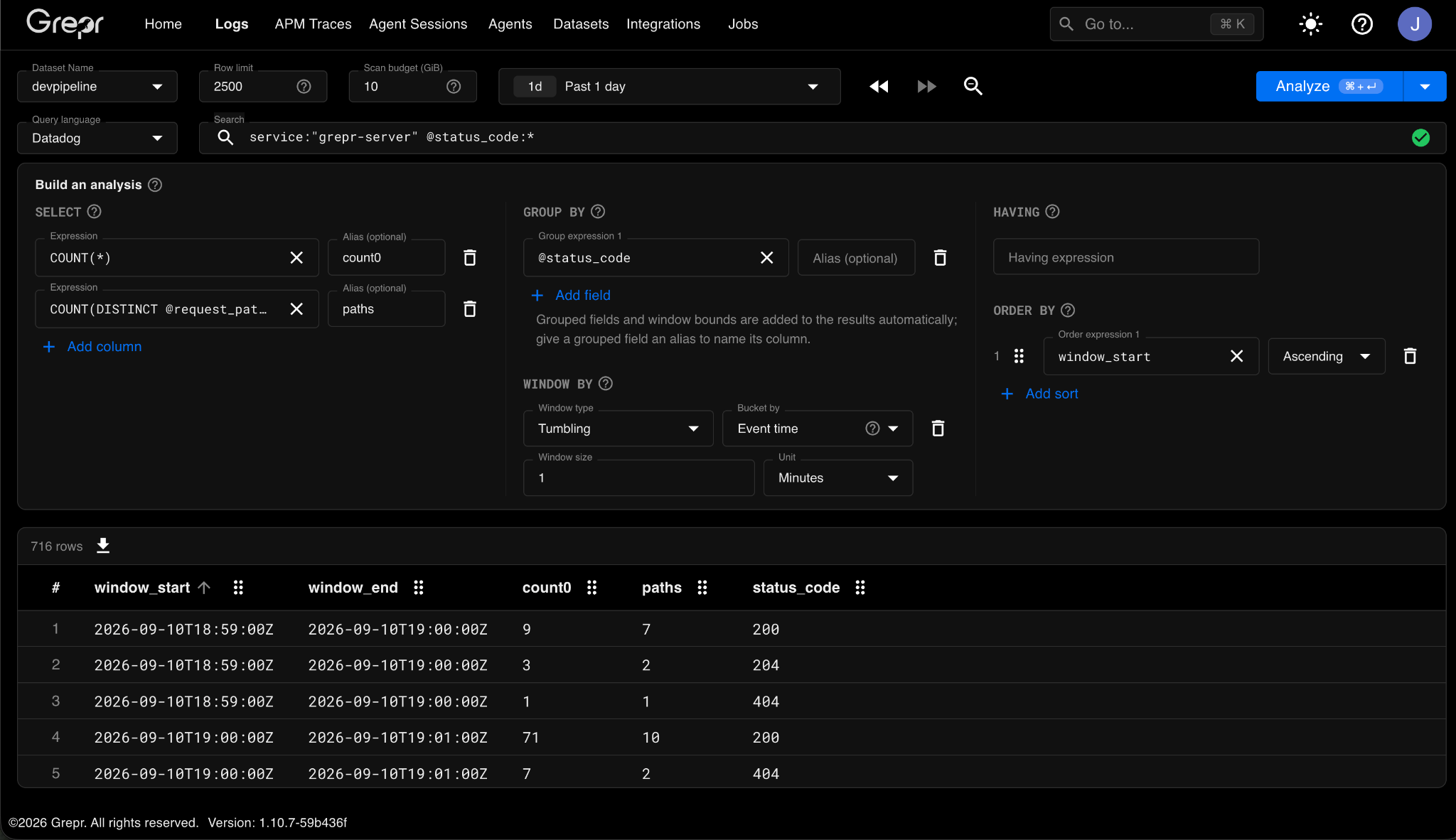
Hit Analyze, and Grepr returns every relevant row.
You can download the results as a CSV.
A data lake makes it easy to ask an expensive question by accident, so the Analyze view gives you two guardrails:
Analytical queries are live for logs now. Trace support is on the way, so you will be able to run the same kind of analysis across the trace data in your lake.
Want to see what it finds in your own data? Schedule a demo.
.png)