3 Advanced Techniques to Reduce Log Volume by 90% (Part Two)

Jad Naous
February 11, 2025
Black and white animated GIF of a large dam with water pouring through multiple spillway gates, illustrating the concept of controlling and managing high-volume data flow.

In the first blog post in the series, I went through four basic ways to reduce logging volumes: increasing the severity threshold, converting logs to metrics, uniform sampling, and drop rules. These techniques work well for smaller, simpler environments, but they lead to missing data that might be important when troubleshooting. Some of them require a significant effort to scale to the enterprise. In this blog post, I'll go through three advanced techniques to reduce log volumes: automatic sampling by pattern, logarithmic sampling by pattern, and sampling with automatic backfilling.

Technique 1: Automatic sampling by pattern

If we can automatically identify, in real-time, the patterns in log messages and track how many messages we're seeing for each pattern, we can then automatically make decisions on how much data to send for each pattern. Here’s how it would work:

  1. As messages come in, build a database of log patterns and pass the messages through.
  2. Keep track of the incoming rate for each pattern.
  3. When a particular pattern crosses some threshold (meaning we've already sent some number of messages for that pattern), start randomly sampling messages for some period of time (say 2 minutes). This sampling passes through a fraction (which could be zero) of additional messages for that pattern.
  4. At the end of that time period, send a summary message for each aggregated pattern with a count of the messages that were skipped for that pattern.
  5. Repeat.
Two samples from each of the two log patterns (GET and POST) are passed through unaggregated, and the rest are aggregated into summary messages.
Pros
  1. Minimal configuration: with a very low effort, this technique can significantly reduce log volumes. Unlike drop rules, no manual pattern configuration or maintenance is required, and it works for all patterns, not just the highest volume ones.
  2. Catches low-volume, important messages: error messages or executions that are infrequent are passed through unsampled, so troubleshooting can use them.
  3. Prevents spurious spikes: new high-volume patterns are automatically identified and sampled.
  4. Maintains relative volumes of patterns: by uniformly sampling data beyond the initial threshold, heavy-flow patterns would continue to be heavier than light-flow patterns. Tools that group by pattern or anomaly detection that relies on anomalous statistical profiles for messages would still work.
  5. Absolute counts for patterns are still available: Dashboards and alerts that rely on absolute values can be updated to include counts from summary messages.
  6. Avoid modifying existing dashboards and alerts: By configuring exceptions for what shouldn't be aggregated you can avoid making changes to your existing setup and minimize impacts to workflows.
  7. Immediate: since pattern detection is real-time, this starts working immediately.
Cons
  1. Loses some data: since high-volume patterns are sampled, those patterns will not have all their data available at the sink.
  2. Reconfiguration: Some dashboards and alerts may need reconfiguration to take summaries into account if exceptions are not configured.
  3. Complexity: capability doesn’t exist in any standard log aggregation tools, and an additional tool may be needed.

Technique 2: Logarithmic sampling by pattern

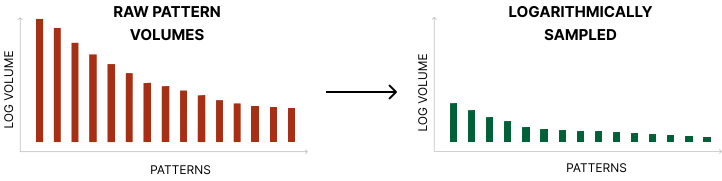
Logarithmic sampling increases volume reduction exponentially over uniform sampling

The previous technique will do two things: 1) guarantee a basic minimum of log messages for every pattern and 2) reduce the rest of the data by a set fraction. However, that's not optimal. This means that your heaviest patterns, which maybe 10000x more noisy than your lightest patterns will be sampled the same amount and you only get a linear decrease in log volumes. Ideally, you want to sample the heavier patterns more heavily than lighter patterns. For example, if you're seeing 100,000 messages per second for pattern A and 100 messages per second for pattern B, you probably want to only pass through 1% of pattern A and 10% of pattern B. This is what logarithmic sampling does.

This technique is an extension of Sampling by pattern, so it has the same pros and cons. The only difference is that it's exponentially (pun intended) more effective. It's also exponentially more effective than the basic uniform sampling technique.

Technique 3: Sampling with automatic backfilling

This last technique reduces the downsides of sampling by storing all the original logs into some low-cost, queryable storage and automatically reloading data to the log aggregator when there’s an anomaly. The anomaly detection could be built into the processing pipeline or it could be external (such as a callback from the observability tool itself). This way, when an engineer goes to troubleshoot the anomaly, the data would already be in the log aggregator.

When there's an anomaly, passthrough additional data and backfill history for anomalous objects.
Pros
  1. Reduces data loss: by automatically backfilling missing data, it’s less likely an engineer wouldn’t find what they need. Assuming manual backfilling is also possible and quick, data loss would be eliminated completely. At the same time, if the data store is queryable by the developer, all the raw data would still be available, albeit with a reduced query performance.
  2. Simplifies deployment: because of the lower risk of data loss, deployment can be faster and more aggressive.
  3. Iterative improvement: can iterate and improve the rules for automated backfilling over time.
Cons
  1. Requires an additional queryable storage: Requires something like a data lakehouse where the cost of storage is cheap but the data is still queryable at fast-enough performance.
  2. Complexity: the ability to handle backfills requires batch processing which is beyond data ingestion, and may require an additional component to be added.
  3. Not perfect: at some point an engineer might need to manually search through the raw data store or execute a manual backfill, which would require them to go to another tool.

Availability

I went through the available public documentation for various tools to check what capabilities are present in each. Where it was clear a technique was possible, I marked the cell with ✔️. Where it was missing, I marked it with ❌.

Grepr is the only solution that implements all advanced techniques. Further, Grepr automatically parses configured dashboards and alerts for patterns to exclude from sampling, and mitigate impacts to existing workflows. In customer deployments, we’ve seen log volume reductions of more than 90%! Sign up here for free, and see the impact Grepr can make in 20 minutes or reach out to us for a demo here.

FAQ

What is automatic sampling by pattern?

Automatic sampling by pattern identifies log message patterns in real time and tracks the volume of each pattern. Once a pattern crosses a defined threshold, the system begins sampling messages for that pattern and periodically sends summary messages with counts of what was skipped, requiring minimal manual configuration.

How does logarithmic sampling differ from uniform sampling?

Uniform sampling applies the same reduction ratio to all log messages regardless of volume. Logarithmic sampling adjusts the sampling rate based on each pattern's volume, so the noisiest patterns get sampled more aggressively while lower-volume patterns pass through at higher rates, producing exponentially greater volume reduction.

What is automatic backfilling and why does it matter?

Automatic backfilling stores all original logs in low-cost queryable storage and automatically reloads relevant data to the log aggregator when an anomaly is detected. This means engineers still have access to full-fidelity data during troubleshooting without paying to index and store everything in an expensive log aggregation tool.

Can these advanced techniques really reduce log volume by 90%?

Yes. By combining automatic pattern detection with logarithmic sampling and backfilling, organizations can achieve 90% or greater volume reduction while preserving the data needed for troubleshooting, alerting, and compliance.

Share this post

More blog posts

All blog posts
Animated GIF from The Simpsons showing Homer, Marge, and Maggie standing in a doorway wearing Hawaiian shirts, looking out at heavy rain with disappointed expressions.
Engineering Guides

How to Reduce New Relic Costs With Grepr: A Step-by-Step Setup Guide

Grepr reduces New Relic costs by applying ML-based log reduction upstream of ingest, summarizing high-volume patterns while preserving unique events, anomalies, and any logs referenced by your existing dashboards and alerts.
February 3, 2026
Retro CGI animation of a yellow humanoid figure standing next to a green geometric computer terminal on a black background
Engineering Guides

Privacy and Data Ownership in Observability Pipelines

Grepr lets you keep your raw log data in your own S3 bucket while still getting the benefits of a managed observability platform.
January 28, 2026
Animated GIF of an intense cartoon ping pong scene featuring a determined purple character in the foreground gripping the table, flanked by two teammates, one green and one pink, all poised for action with dramatic lighting.
Product Features

Observability Cost Control: How Grepr and Edge Delta Take Different Paths to the Same Goal

Both Edge Delta and Grepr use AI to process observability data streams, but Grepr's automatic pipeline management delivers faster time-to-value with minimal configuration while Edge Delta requires ongoing manual maintenance.
January 27, 2026

Get started free and see Grepr in action in 20 minutes.