Product Features
Grepr Live View: Test Pipeline Changes with Production Data


Grepr pipelines ingest logs from shippers, reduce volume by up to 90%, and route data to observability platforms. When you need to modify a production pipeline, most tools force you to choose between testing in a staging environment that doesn't match production or making changes directly in production and hoping for the best.
Live View gives you a better option. It clones your production pipeline, processes real data through your changes, and shows you the exact results before you commit.
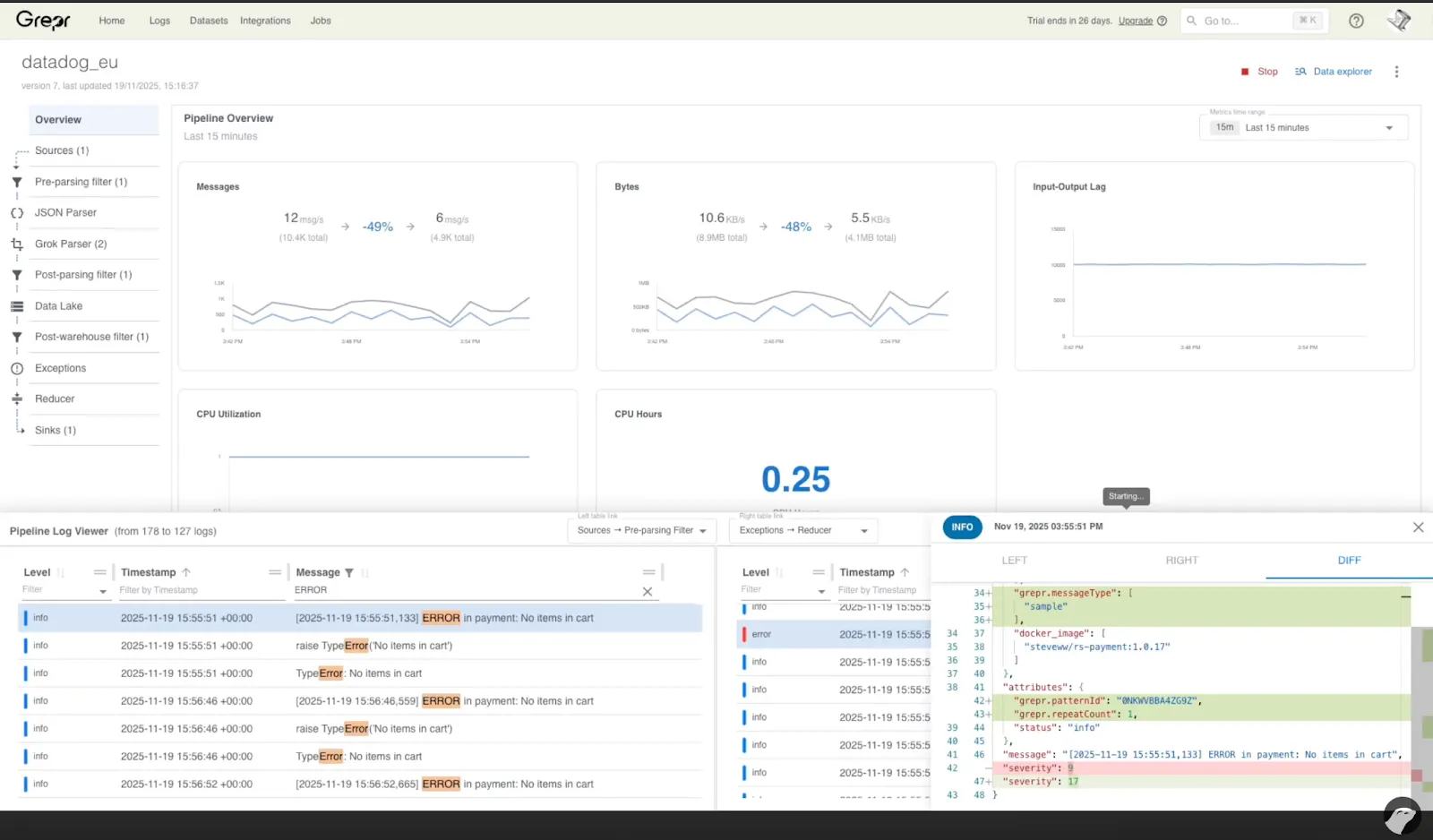
Live View creates a clone of your production pipeline without the sink attached. The clone receives the same live data as production but outputs nothing. You modify the clone, preview the results, and apply changes when ready.
The process:
You test with actual production data in an isolated environment. You see exactly what will happen before anything goes live.
You need to extract severity levels from unstructured logs.
In Live View:
Add a Grok parser to the cloned pipeline.
Create a filter to focus on relevant messages.
Start the clone.
Select a message. You see three views: the original message, the transformed message, and a diff. The Grok parser extracted the severity field and added it as a structured attribute. Exactly what you needed.
Apply to production and done.
Faster iteration: Changes that used to require coordination and careful timing now take 10-15 minutes. You can optimize pipelines continuously instead of letting issues accumulate.
Zero-risk testing: You're testing with production data in an isolated environment. If something doesn't work as expected, nothing breaks.
No infrastructure overhead: Unlike other tools that require separate staging environments and data replication, Live View uses your existing pipeline configuration and live data stream. No additional infrastructure to maintain.
The cloned pipeline:
Changes apply atomically to production - no partial updates or no intermediate states.
Live View is available on all Grepr production pipelines. Open it from the pipeline dashboard. There’s no additional configuration required.
Watch the walkthrough video to see the full workflow:
Grepr Live View is a pipeline testing feature that creates an isolated clone of your production pipeline. The clone receives the same live data stream as production but processes it without outputting to any sink or data lake. You modify the cloned pipeline configuration, watch real-time processing results, and review before/after comparisons of your changes. When satisfied with the results, you apply the changes atomically to production. The entire process typically takes 10-15 minutes and requires no separate staging infrastructure.
Live View creates a complete copy of your production pipeline in the same environment but disconnects all output destinations (sinks and data lakes). The clone processes the identical live data stream your production pipeline receives, so you test with real traffic patterns and message formats. Since the clone outputs nothing, your production data flow remains untouched. Changes exist only in the clone until you explicitly apply them to production through an atomic update operation.
You can test any pipeline configuration change including adding or modifying Grok parsers, adjusting filters, creating new transforms, changing routing rules, and updating field extraction logic. Live View supports testing complex multi-step changes where you need to see cumulative effects across multiple processors. The before/after/diff view shows exactly how each message transforms through your modified pipeline, making it effective for both simple single-parser additions and complex pipeline refactoring.
Staging environments require maintaining separate infrastructure, replicating production data, and accepting that test data never perfectly matches production traffic. Live View eliminates these problems by using your actual production data stream in an isolated clone. You see real message formats, actual traffic volumes, and genuine edge cases without infrastructure overhead. Testing completes in minutes rather than requiring coordination across teams to deploy to staging, verify results, and then deploy again to production.
Live View requires zero additional setup. It is available immediately on all Grepr production pipelines through the pipeline dashboard. The feature uses your existing pipeline configuration and taps into your live data stream without requiring data replication, separate clusters, or configuration management. You open Live View, make changes, test with live data, and apply to production. The cloned pipeline automatically terminates when you close Live View or apply changes, leaving no resources to clean up.